出现这个问题是因为服务的文件句柄超出系统限制。当Go服务程序出现这个问题,首先应该看系统设置,然后再看程序本身。
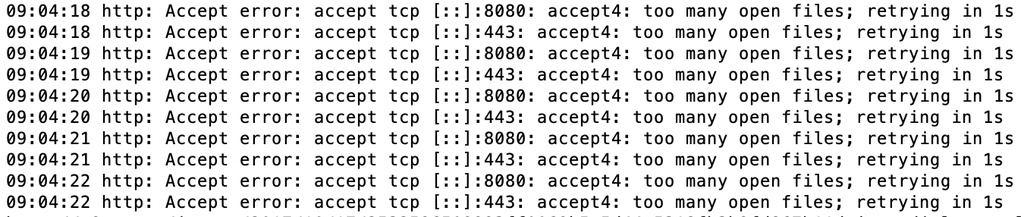
大量的 accept4 错误
1
2
http: Accept error: accept tcp [::]:8080: accept4: too many open files; retrying in 1s
http: Accept error: accept tcp [::]:443: accept4: too many open files; retrying in 1s
系统设置
首先查看系统
1ulimit -n
默认是 1024 ,要改大一些。
1ulimit -n 524288
这是临时的修改,要永久的修改,可修改文件 /etc/security/limits.conf 参见
- Linux 系统永久设置ulimit https://pylist.com/t/1516149794
看系统之后还要看你的程序的句柄限制,因为你的程序部署问题,系统设置修改了,但程序的设置还没变。可以使用下面命令行查看程序的限制
1cat /proc/{your_app_pid}/limits
结果可能类似这样:
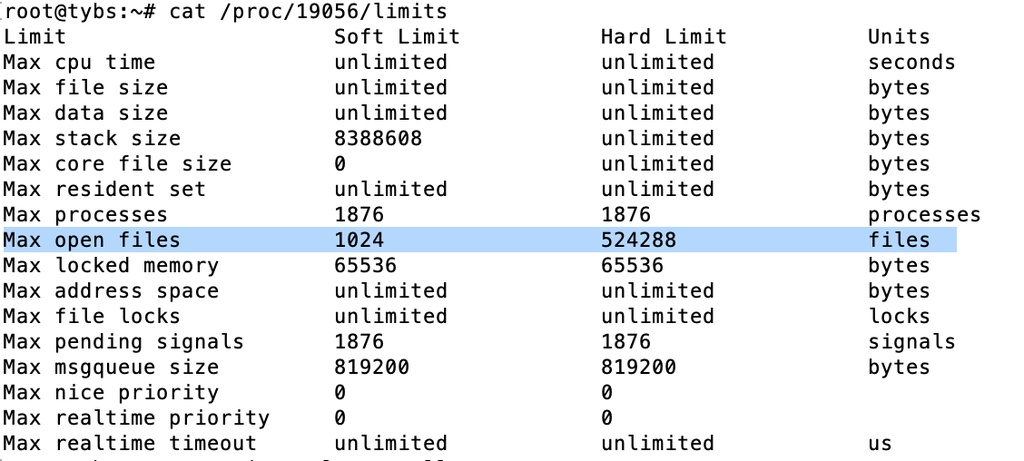
上图的 Solft Limit 还是 1024,我用的是 supervisor ,必须重启 supervisor。重启后参数如下图:
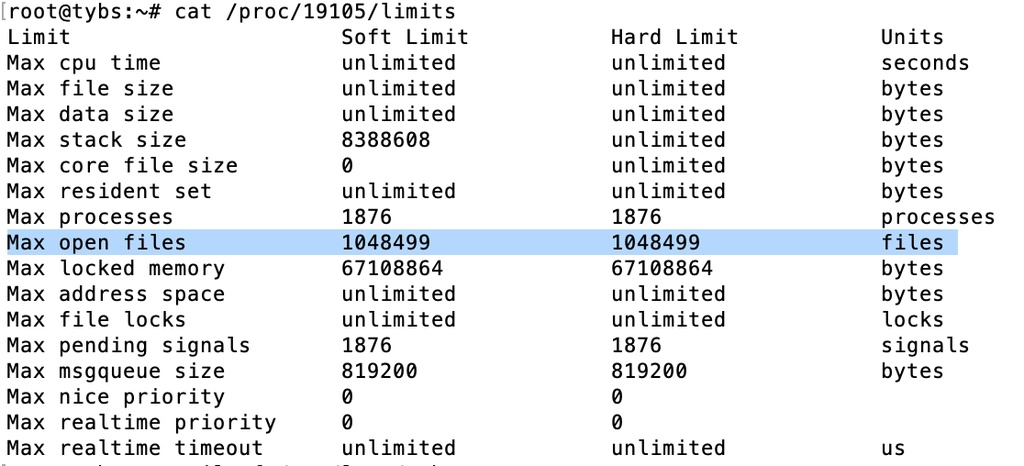
注意 这里重启不能用系统自带的,如:
1/etc/init.d/supervisor restart
否则还是 Max open files 1024 ,要先 kill 掉 /usr/bin/python2 /usr/bin/supervisord 的进程,然后运行
1
2
3
supervisord
or
/usr/bin/supervisord -c /etc/supervisor/supervisord.conf
更新
如果使用系统的服务重启 supervisor ,则仍然没生效,解决办法:
- 打开文件
/etc/systemd/system.conf - 修改两行
DefaultLimitNOFILE=1048576:2097152DefaultLimitNPROC=262144:524288
- 实行命令
systemctl daemon-reexec - 退出重新登录
systemctl restart supervisor.servicecat /proc/[pid]/limits看看
就是这结果
1
2
3
Max processes             262144               524288               processes
Max open files            1048576              1048576              files
程序设置
如果不注意,代码里可能存在一些连接泄漏。常见的泄漏是在 http.Response 调用之后忘记调用 resp.Body.Close(),或者是放置位置不对。
空闲连接可能是另一个可能的原因。 默认情况下,会使用缓存来重用连接。访问许多主机时,这可能会留下许多打开的连接。 可以使用 Transport 的 CloseIdleConnections 方法以及MaxIdleConnsPerHost 和 DisableKeepAlives 字段来管理此行为。
如果是这种情况,可以尝试在传输句柄上显式调用 CloseIdleConnections 或减小MaxIdleConnsPerHost 的值。
还应该在 http server/client 添加超时机制来避免连接泄漏,如:
1
2
3
4
5
6
7
8
9
10
11
12
13
14
15
16
17
18
srv := &http.Server{
    ReadTimeout:  5 * time.Second,
    WriteTimeout: 10 * time.Second,
    IdleTimeout:  120 * time.Second,
    TLSConfig:    tlsConfig,
    Handler:      serveMux,
}

var tr = &http.Transport{
		TLSClientConfig:       &tls.Config{InsecureSkipVerify: true},
		TLSHandshakeTimeout:   5 * time.Second,
		ResponseHeaderTimeout: 10 * time.Second,
		ExpectContinueTimeout: 1 * time.Second,
	}
var httpClient = &http.Client{
		Timeout:   time.Second * 30,
		Transport: tr,
	}
下面的命令可以让你判断是不是连接池中的连接有没有正确关闭:
1
2
3
4
5
6
7
# cat /proc/19213/net/sockstat
sockets: used 109
TCP: inuse 4 orphan 0 tw 14 alloc 9 mem 2
UDP: inuse 5 mem 16
UDPLITE: inuse 0
RAW: inuse 0
FRAG: inuse 0 memory 0
如果 TCP inuse 很大,就很有可能是连接没有正确关闭。
本文网址: https://py.youbbs.org/topic/201.html 转摘请注明来源
1 thoughts on "Golang 服务之坑:too many open files"
你好,我是 pylists.com云课堂系统的独立开发者,想购买你的域名 pylist.com,不知道你是否可以转让给我,我买域名之前一直没有联系到你。